What you need
| Loader | 26.3.x | 26.2.x | 26.1.x | 1.21.x | 1.20.x | 1.19.x | 1.18.x | 1.13.x |
|---|---|---|---|---|---|---|---|---|
| Bukkit | 26.3 | 26.2 | 26.1 - 26.1.2 | 1.21 - 1.21.11 | 1.20 - 1.20.6 | 1.19 - 1.19.4 | 1.18 - 1.18.2 | 1.13 - 1.13.2 |
| Paper | 26.3 | 26.2 | 26.1 - 26.1.2 | 1.21 - 1.21.11 | 1.20 - 1.20.6 | 1.19 - 1.19.4 | 1.18 - 1.18.2 | 1.13 - 1.13.2 |
| Purpur | 26.3 | 26.2 | 26.1 - 26.1.2 | 1.21 - 1.21.11 | 1.20 - 1.20.6 | 1.19 - 1.19.4 | 1.18 - 1.18.2 | 1.13 - 1.13.2 |
| Spigot | 26.3 | 26.2 | 26.1 - 26.1.2 | 1.21 - 1.21.11 | 1.20 - 1.20.6 | 1.19 - 1.19.4 | 1.18 - 1.18.2 | 1.13 - 1.13.2 |
| Project kind | Server plugin |
|---|---|
| Minecraft versions | See the version table above |
| Loaders | Bukkit, Paper, Purpur, Spigot |
| Required libraries | None listed |
| Install on | Server only (players do not need it) |
| Difficulty | Advanced |
| How you get the wings | Commands |
| Wing kind | Angel, Demon & bat, Dragon, Fairy & butterfly, Bird & feather |
- Supported server platforms: Bukkit, Spigot, Paper, and Purpur.
- This is a server-only plugin; players do not need to install anything on their clients.
- No external library plugins are required.
- Java 8 is required for Minecraft 1.13 to 1.13.2.
- Java 17 is required for Minecraft 1.18 to 1.20.4.
- Java 21 is required for Minecraft 1.20.5 to 1.21.11.
- Java 25 is required for Minecraft 26.1 to 26.3.
- Folia servers are not supported.
How to install
- Set up a Bukkit, Spigot, Paper, or Purpur server running a supported Minecraft version (1.13 through 1.13.2, 1.18 through 1.21.11, or 26.1 through 26.3).
- Stop your server if it is currently running.
- Place the Trail Studio .jar file into your server's plugins folder (do not install it on the client).
- Start the server to generate the configuration files inside plugins/TrailStudio/.
- Join the server and run /trails (or /trailstudio) to verify that the selection menu opens.
- When updating from an older version, delete the old Trail Studio .jar and keep your existing plugins/TrailStudio/ folder.
Step-by-step help: How to install server plugins · How to fix mods not loading.
How to get the wings
- Players join with no effects active. By default, 28 presets are open to everyone, while the rest require permissions (server operators have all enabled presets unlocked by default).
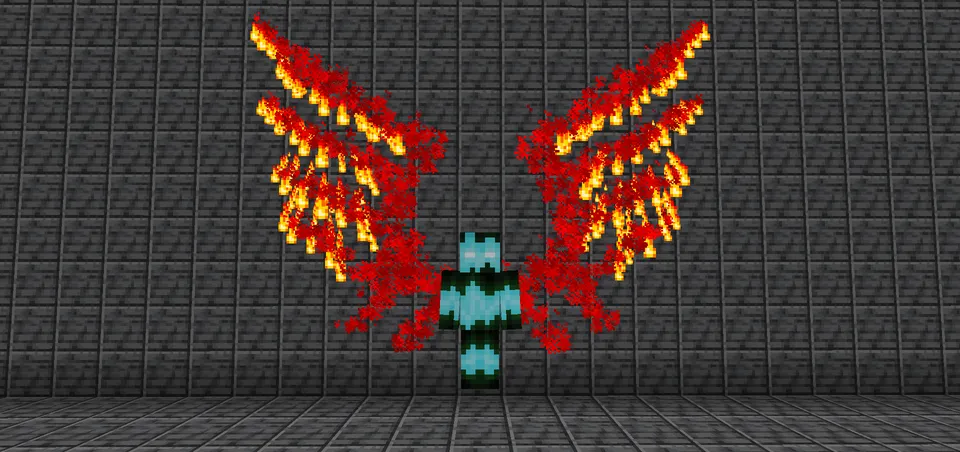
- Run /trails (or /trailstudio) to open the GUI menu and browse the Wings collection, which includes 12 presets such as Cloud Angel, Petal Butterfly, Solar Phoenix, Ice Dragon, and Night Bat.
- Left-click a wing effect in the menu to equip it, or left-click an active effect again to unequip it.
- Alternatively, equip a wing preset directly via command using /trails equip <effect> (use /trails list wings to see the exact command IDs).
- Grant players access to restricted wings using permissions: give trailstudio.category.wings to unlock all 12 wing designs, or trailstudio.effect.<effect> (for example, trailstudio.effect.wings-solar-phoenix) for a single wing preset.
Controls
- In the /trails menu: left-click an effect to equip or remove it, right-click to view a private preview, and shift-click to add or remove it from your Favourites.
- In the Saved Combinations submenu: right-click one of the three slots to save your current setup, and left-click a slot to load it (or use /trails save <1-3> and /trails load <1-3>).
- In the Your Style submenu (or via commands): adjust dust colour (/trails color <preset/rainbow/hex>), pattern size (/trails size <small/normal/large>), animation speed (/trails speed <slow/normal/fast>), and particle viewing quality (/trails quality <low/medium/high>).
- Run /trails toggle to pause or resume your own equipped effects.
- Run /trails hide to hide or show effects worn by other players.
- Run /trails remove [category] to clear an effect from one collection, or omit the category to remove all active effects.
Config
- Main plugin settings are stored in plugins/TrailStudio/config.yml, and individual presets are configured in plugins/TrailStudio/effects.yml.
- Run /trails reload after editing files to apply changes without restarting the server; if an edit is invalid, the plugin keeps the previous working settings and logs a console message.
- In config.yml, you can set world exclusions, adjust the maximum number of effects a player can wear at once (default is three), change viewing distance, and cap particle limits for busy areas.
- Effects automatically pause while sneaking or during combat by default; you can adjust these rules in config.yml.
- To disable the enchantment glow on equipped items in the GUI, set glow-selected-effects: false under the menu: section in config.yml (add this key manually if updating from an older config).
- In effects.yml, you can edit any preset's display name, colours, particle type, shape, speed, size, menu icon, or permission node, or duplicate a block with a new ID to make a custom preset.
- To make a restricted preset free for all players without permissions, set its permission field to an empty string (permission: '') in effects.yml.
- Menu icons accept valid server material names (such as AMETHYST_SHARD or minecraft:amethyst_shard); invalid icons fall back to paper and log a warning.
- An optional join credit message is controlled by credit developer: false at the bottom of config.yml.
Tips
- You can wear up to three different effects at the same time by default, letting you combine wings with auras, footsteps, or trails.
- Custom colour settings apply to coloured dust particles, while fixed-colour particles like flames and hearts keep their standard Minecraft appearance.
- Player loadouts and active selections are saved automatically across logouts and server restarts.
- Effects automatically hide when you drink an invisibility potion so they do not give away your position.
Compatibility
- Respects standard player visibility states and common vanish plugin settings when hiding effects.
- On older Minecraft versions that lack newer particle types, the plugin substitutes alternative particles, so certain presets will look different depending on your server version.
- Folia is not compatible with this plugin.
Questions and answers
Do players need to install a mod on their client to see the wings?
No. Trail Studio is a server-only plugin that uses standard Minecraft particles, so vanilla clients can see all wings and trails without client mods.
How do I give a player access to every wing preset?
Grant them the permission node trailstudio.category.wings, or remove the permission requirement on individual wing entries in effects.yml by setting permission: ''.
How many effects can I wear at the same time?
By default, you can equip up to three effects simultaneously. Server administrators can change this limit in config.yml.
Why did my wings stop showing while I was fighting or crouching?
By default, Trail Studio pauses wearable effects while you are sneaking, in combat, or under the effect of an invisibility potion. Server admins can change the sneaking and combat behaviour in config.yml.
Does Trail Studio work on Folia servers?
No, Folia is not supported. Use Bukkit, Spigot, Paper, or Purpur.