What you need
| Game versions (tagged) | 1.21, 1.20.0, 1.20.30, 1.20.60, 1.20.80, 1.19 (tagged by the uploader) |
|---|---|
| Experimental toggles | Needed: Other |
| Edits player.json | Yes (conflicts with other add-ons that edit the player) |
| Files | DarkDragoBP.mcpack, DarkDragoRP.mcpack |
| Platforms | Android, iOS, Windows (consoles: through a Realm or a world that already has it) |
| Difficulty | Intermediate |
| How you get the wings | Crafting, Mob drops |
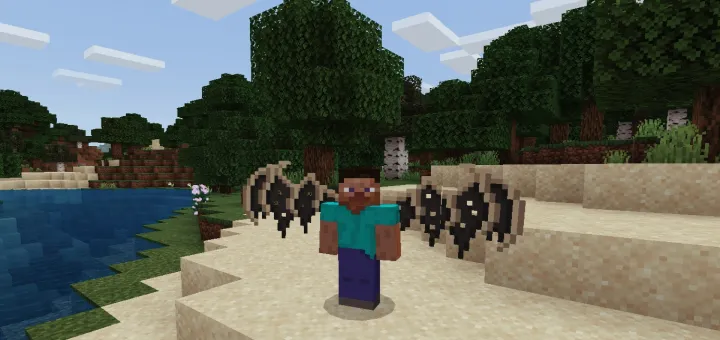
| Wing kind | Demon & bat, Dragon |
- Tagged by the uploader for Bedrock versions 1.19, 1.20.0, 1.20.30, 1.20.60, 1.20.80, and 1.21; treat these version tags as guidance rather than a strict guarantee.
- Includes two separate files: DarkDragoBP.mcpack (behavior pack) and DarkDragoRP.mcpack (resource pack). Both must be activated on your world.
- The install notes state that experimental gameplay must be enabled, though specific toggle names are not listed.
- This add-on modifies player.json, meaning it will conflict with other add-ons that also alter default player behavior.
How to install
Android
- Locate both DarkDragoBP.mcpack and DarkDragoRP.mcpack in your file manager and tap each one to open and import them into Minecraft.
- Create a new world or edit an existing one, then go to Settings -> Game -> Experiments and turn on the experimental toggles before loading the world (this disables achievements and cannot be undone later).
- Activate the behavior pack and resource pack under the world's Add-Ons tabs.
iPhone and iPad
- Open the Files app, tap DarkDragoBP.mcpack and DarkDragoRP.mcpack one by one so Minecraft imports both packs.
- In your world settings under Game -> Experiments, enable the experimental toggles before entering the world for the first time (note that experimental toggles disable achievements and cannot be turned off later).
- Enable both the resource pack and behavior pack in the world's Add-Ons section.
Windows
- Double-click DarkDragoBP.mcpack and DarkDragoRP.mcpack so Minecraft for Windows imports both packages.
- Open your world settings, navigate to Game -> Experiments, and switch on the experimental toggles prior to starting the world (this action cannot be reversed and turns off achievements).
- Apply both the behavior pack and resource pack to your world.
Xbox, PlayStation and Switch
- Xbox, PlayStation, and Nintendo Switch do not support importing .mcpack files directly from a browser or file manager.
- To use this add-on on a console, join a Realm, server, or multiplayer world hosted by a PC or mobile player who already has both packs and experimental toggles active.
Step-by-step help: How to install Bedrock add-ons.
How to get the wings
- Kill bats to collect Bat Wings.
- Find and kill bloody zombies (which behave like regular zombies) to obtain Blood Buckets.
- Craft a Blood Charge using 1 Fire Charge and 4 Blood Buckets.
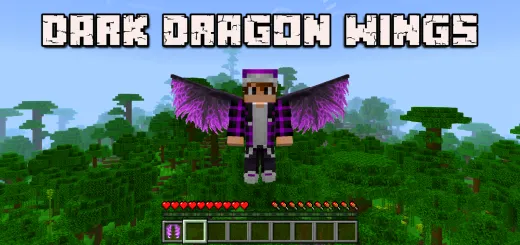
- Craft the Dark Dragon Wings using 4 Blood Diamonds and Bat Wings. Note: the description does not explain the exact grid arrangement or how Blood Diamonds are crafted from Blood Charges; check the recipe book in-game or search the creative inventory for 'wing' or 'blood' if you get stuck.
Controls
- Equip wings: Right-click (or use/interact button on touch and controller) while holding the wings.
- Activate flight mode: Right-click (or use/interact) once the wings are worn.
- Fly and ascend: Press the jump button.
- Deactivate flight mode: Press the sneak button.
- Unequip wings: Hold sneak and right-click (or use/interact).
Tips
- Since bloody zombies share the same traits as regular zombies, hunt them at night or in dark caves to farm the 4 Blood Buckets needed per Blood Charge.
- Practice toggling flight off with the sneak button near the ground so you do not drop from high altitude by accident.
- If a crafting recipe does not appear automatically in your survival recipe book, test the item combinations in a creative world first.
Compatibility
- Because this pack edits player.json to handle flight and hovering, do not combine it with other wing add-ons, custom animation packs, or combat packs that also modify player.json.
- Place this add-on at the top of your behavior and resource pack lists if you run into animation or control issues alongside simpler packs.
Questions and answers
How do I put on and take off the Dark Dragon Wings?
Right-click (or use your interact button) to wear the wings. To take them off, hold sneak and right-click.
How do I start and stop flying?
Once wearing the wings, right-click to enable flight mode and press jump to fly. Press sneak to stop flying.
Where do I get Blood Buckets and Bat Wings?
Bat Wings drop when you kill bats, and Blood Buckets drop when you kill bloody zombies.
How do I get Blood Diamonds?
The description states you need 4 Blood Diamonds and Bat Wings to craft the wings, and mentions crafting a Blood Charge from 1 Fire Charge and 4 Blood Buckets, but does not give the exact step for Blood Diamonds. Check your in-game recipe book or the creative inventory search.
Do I need both .mcpack files?
Yes. You must import and activate both DarkDragoBP.mcpack and DarkDragoRP.mcpack for the items, mobs, and animations to work.