What you need
| Loader | 26.2.x | 26.1.x | 1.21.x |
|---|---|---|---|
| Fabric | 26.2 | 26.1.2 | 1.21.1 |
| Project kind | Mod |
|---|---|
| Minecraft versions | See the version table above |
| Loaders | Fabric |
| Required libraries | None listed |
| Install on | Client and server (install it on both in multiplayer) |
| Difficulty | Beginner |
| How you get the wings | Crafting |
| Wing kind | Magic |
- Fabric Loader 0.19.3 or newer is required.
- Fabric API and GeckoLib are required dependencies according to the mod description.
- Java 21 is required for Minecraft 1.21.1.
- Java 25 is required for Minecraft 26.1.2 and 26.2.
- Both the client and the server need the mod and its dependencies installed.
- Do not install this mod in the same instance as the full Liberty Gear Evolution mod.
How to install
- Install Fabric Loader (version 0.19.3 or newer) for Minecraft 1.21.1, 26.1.2, or 26.2.
- Download the Liberty Wings .jar file that matches your exact Minecraft version.
- Download the matching versions of Fabric API and GeckoLib for Fabric.
- Place the Liberty Wings .jar, Fabric API, and GeckoLib into your mods folder on both the client and the server.
- Launch the game once and check your inventory or crafting table to verify the mod is loaded.
Step-by-step help: How to install Fabric · How to install Java mods · How to fix mods not loading.
How to get the wings
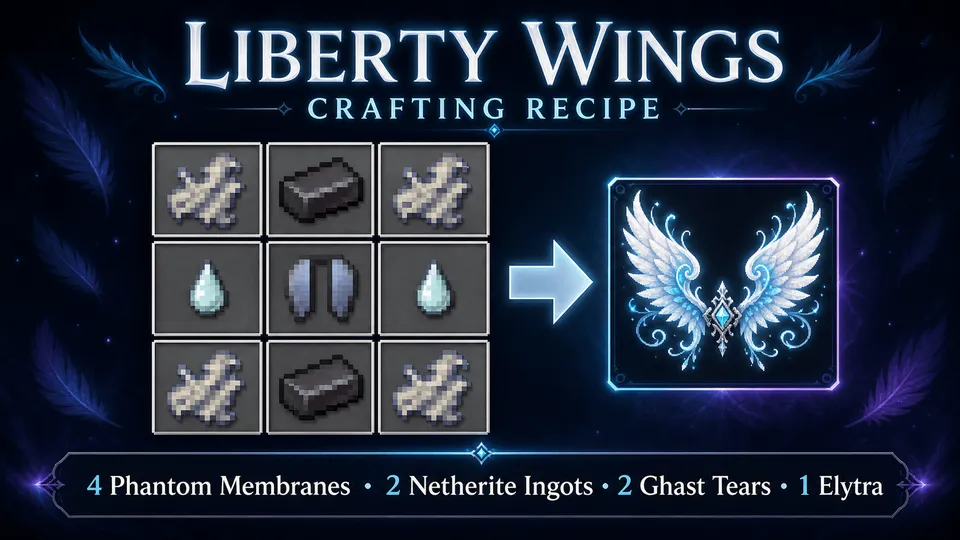
- You can craft the wings at a crafting table using a 3x3 shaped recipe.
- Top row: Phantom Membrane, Netherite Ingot, Phantom Membrane.
- Middle row: Ghast Tear, Elytra, Ghast Tear.
- Bottom row: Phantom Membrane, Netherite Ingot, Phantom Membrane.
- Note that the Elytra used in the center of the recipe is consumed upon crafting.
- Once crafted, equip the wings into their dedicated slot by right-clicking or Shift-clicking.
Controls
- Hold Jump to take off and fly upward.
- Press Forward to fly at normal speed.
- Hold Sprint and Forward together for fast flight.
- Press Sneak to toggle hover mode on or off.
- Release your movement keys to begin a controlled descent and landing.
Tips
- Your wings stay equipped even after you die, log out, or reconnect to a server.
- Having the wings equipped protects you from taking fall damage.
- If you also use the Liberty Sea Tail mod, entering water will temporarily hide your wings and pause flight until you exit the water.
Compatibility
- Compatible with the standalone Liberty Sea Tail companion mod.
- Incompatible with the full Liberty Gear Evolution mod; do not install them together.
Questions and answers
Which Minecraft versions and loaders are supported?
The mod supports Minecraft 1.21.1, 26.1.2, and 26.2 on the Fabric loader (version 0.19.3 or newer).
Do I need to install Liberty Wings on both the client and the server?
Yes. Both the server and every connecting client need the mod and its required dependencies installed.
What other mods are required for Liberty Wings to work?
According to the description, you need Fabric API and GeckoLib installed alongside the mod.
Do I lose my equipped wings when I die?
No. The dedicated wing equipment slot retains your wings through death, logout, and server reconnection.
Can I use this mod with Liberty Gear Evolution?
No. This is a standalone mod and should not be installed in the same instance as the full Liberty Gear Evolution mod.