What you need
| Loader | 1.20.x |
|---|---|
| Forge | 1.20.1 |
| Project kind | Mod |
|---|---|
| Minecraft versions | See the version table above |
| Loaders | Forge |
| Required libraries | None listed |
| Install on | Client and server (install it on both in multiplayer) |
| Difficulty | Beginner |
| How you get the wings | Crafting, Creative only |
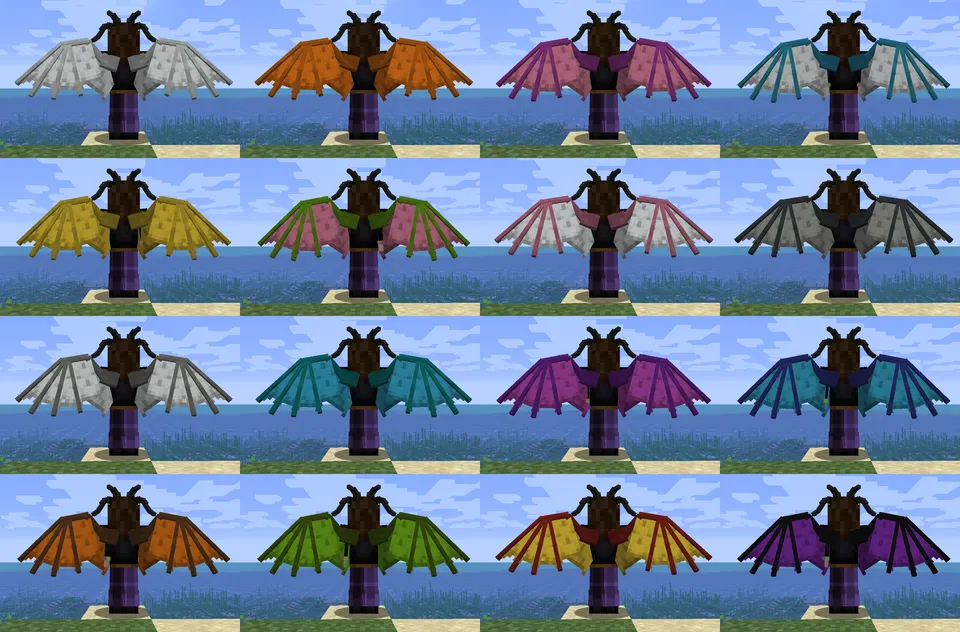
| Wing kind | Mechanical & tech |
- Requires Minecraft Forge for version 1.20.1.
- Requires Java 17 (standard for Minecraft 1.18 to 1.20.4).
- No extra library mods are required.
- Must be installed on both the client and the server for multiplayer use.
How to install
- Install the Forge mod loader for Minecraft 1.20.1.
- Locate your Minecraft mods folder (on both client and server if playing multiplayer).
- Place the KukisWingsJetpack.jar file into the mods folder.
- Launch Minecraft 1.20.1 using your Forge profile and check the Mods menu or Creative inventory to verify the mod loaded.
Step-by-step help: How to install Forge · How to install Java mods · How to fix mods not loading.
How to get the wings
- The description does not list a crafting recipe or command to obtain the wings and jetpack.
- Check the Creative mode inventory or inspect the items in a recipe viewer like JEI, EMI, or REI (press R on the item for recipes, U for uses).
Questions and answers
Which Minecraft version and loader do I need for Kuki's Wings / Jetpack?
You need Minecraft 1.20.1 running the Forge mod loader.
Does this mod require any dependency libraries?
No, the project data lists no required or optional external libraries.
Do I need to install the mod on both the server and client?
Yes, since it adds custom flight equipment items, it must be installed on both your client and the multiplayer server.
How do I craft the wings and jetpack?
The mod description does not state any crafting recipes. Use a recipe viewer mod like JEI, EMI, or REI in-game by pressing R while hovering over the item, or grab the gear from the Creative inventory.